Tamar Levi-Ahdut ← All work

Case study 01 · Duda

The Dynamic
Repeater

A widget that connects any layout to a data source and populates it automatically. Design once → repeat everywhere

Role
UX owner
Team
Duda’s Editor
Timeline
1.5 months (three sprints)
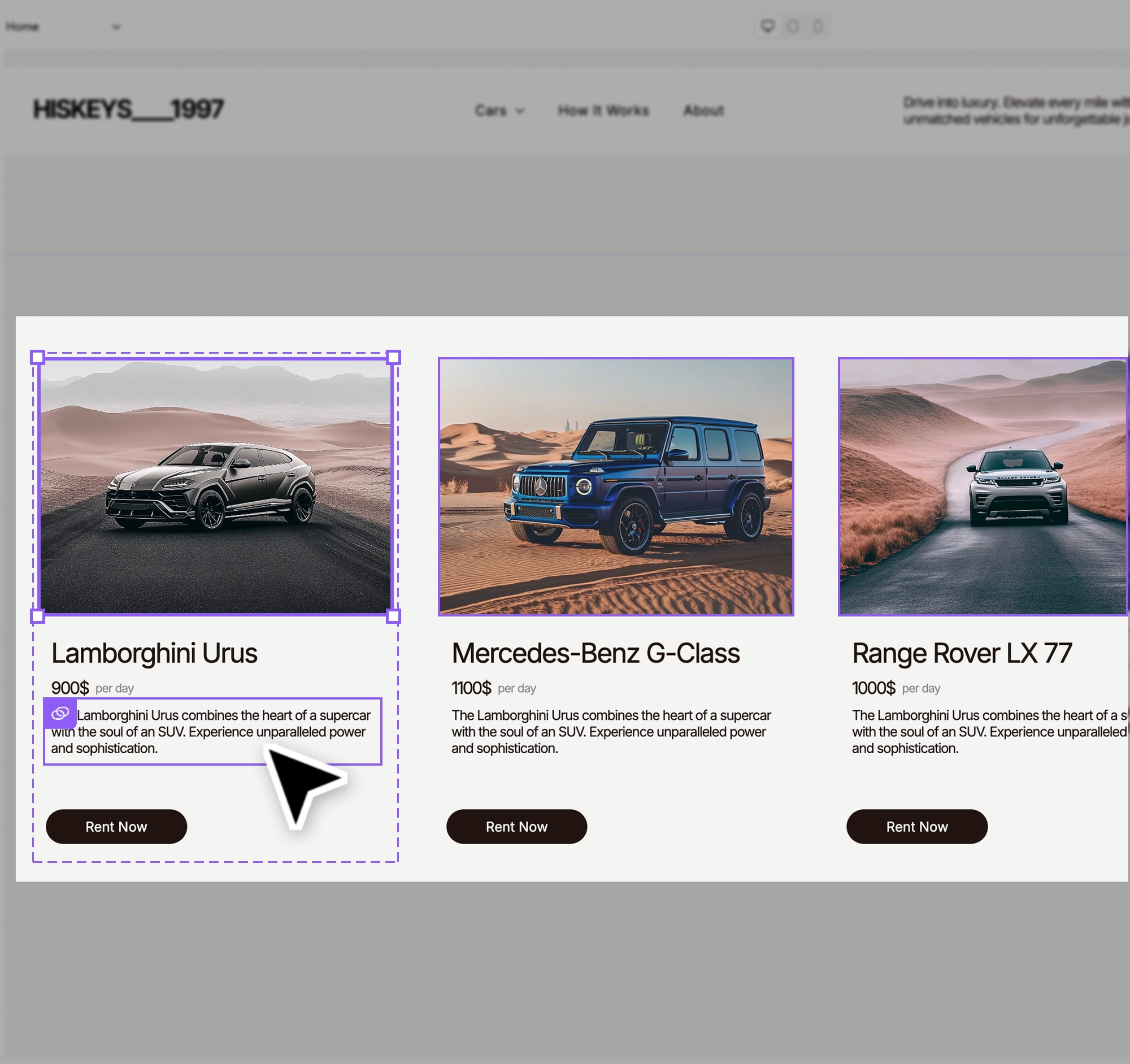
The Dynamic Repeater onboarding modal: collection items repeating in one connected layout

Why we needed it

  1. Unlock AI-driven content at scaleConnected layouts let AI generate and push content directly into place- and when data changes, every item reflects it automatically. Impossible with static blocks.
  2. Enable faster, consistent designEdit one repeater item and all instances update automatically.
  3. Meet user expectationsEvery major competitor offers a repeater- Duda users were asking for it and we couldn't ignore the gap.

How we approached it

Concept- use an existing structure

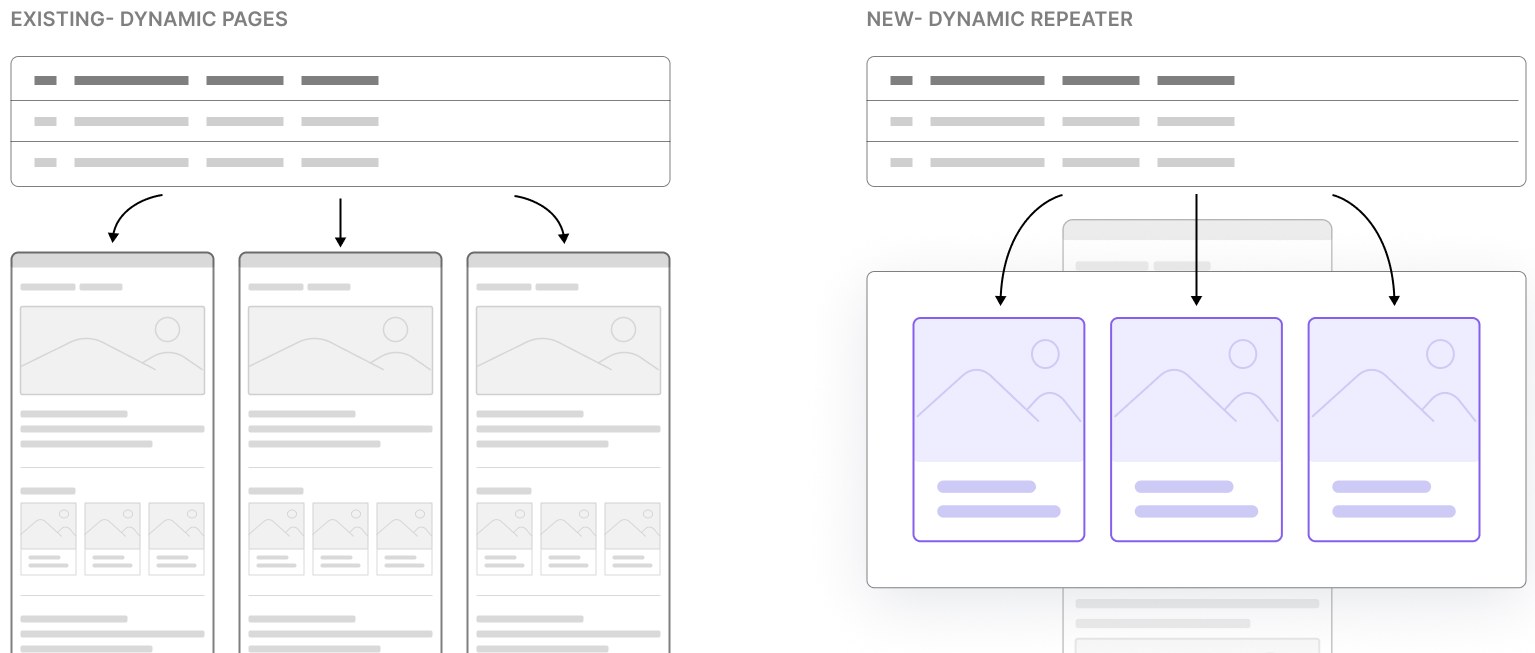
‘Dynamic Pages’ is an existing feature widely used by our largest partners. Each collection row becomes a separate page from a shared template. Same page layout, dynamic content

Diagram. Existing, Dynamic Pages: each collection row becomes its own page. New, Dynamic Repeater: each row becomes a card inside one layout.

Current solution

Dynamic Pages flow

User action System response Always available
Add Dynamic Page
Template collection auto-created
Convert page/widget to a dynamic one
Select/create a collection
Replace or Edit collection
Placeholders
Add widgets
Connect widgets

Inline Design | Edit layout and widgets at any point- design once and it applies to all dynamic pages

Add/Edit collection | Add/delete columns & rows available at any point- once connected, the content filled the widgets automatically

How I used AI

AI moves fast, and I move with it - constantly exploring where it can help me

Claude Design wasn’t available at the time of this project

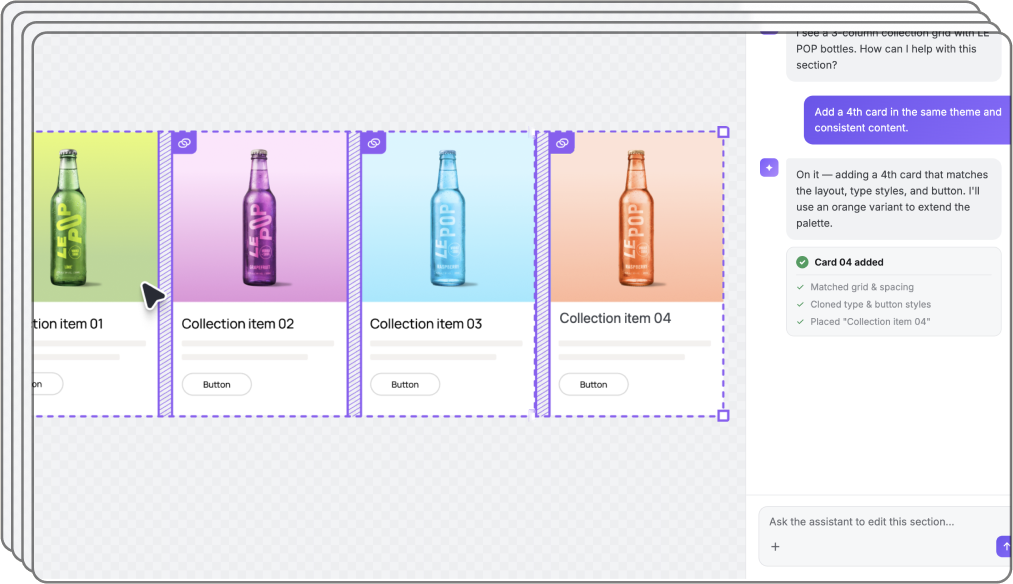
Figma Make demo: an AI assistant adds a fourth card to a connected collection grid
A demo I built with Figma Make for a partner summit

Research

Meet Duda’s users

The designer

Nick · Hibu agency partner

"I fixed the card design- but 30 copies are still out of sync."

  • Connectable widgets offer limited layouts- can't display 2 buttons or a title + subtitle
  • Design changes must be applied manually to every duplicate- inconsistencies creep in

The end client

Dana · Small business owner

"My designer set everything up- I just need to update the content without breaking the site."

  • My designer built the site- I just need to keep the content up to date
  • I'm not technical- the collection feels overwhelming and I'm scared to break something

The content creator

Sangeetha · Hibu agency partner

"There's no way to push all my content into the layout at once."

  • Can't use AI to bulk-populate content into layouts
  • Must open the editor just to edit a product description- no back office option

What the market does & where we stand out

Competitive landscape

FeatureWebflowWixFramerElementorDuda
NameCollection ListRepeaterCMS ListLoop BuilderDynamic Repeater
Drag component✓✓✓✓MVP
Design editingOne item visualPer item or globalFirst item onlySeparate screenMVP Per item visual
Field bindingManual per widgetManual can unbindManual via sidebarDynamic tags widget✓ Manual per widget
Visual binding cues✓ Purple labels✕✕✕P1 Color + labels
Static (unbound) mode✕✓ Partial✕✕✕
Uniformity enforcement✓ Same layout~ CMS only✓ First item✓ Loop template✓
Filtering & sorting✓ By category✓ From CMS✕✓ Query controlsP2
Pagination / view more✓✓✓✓P2
Item reordering✓ From CMS✓ From table✕✕✓ From CMS
Empty state logic✓ Placeholder✕ Not defined✕✕✓ Placeholder
Layout controlGrid / FlexRows / ColumnsStack + gapLoop GridInner Rows / Columns
Presets & templates✕✓ CMS layouts✓ Best practices✓ Loop templates✓ Use existing
Dev extensibility✕✓ Velo API✕✓ WP hooks✕
Inline editing✕✕✕✕P2 Only us

Key insights

01

‘Add’ as an entry point

Competitors analysis and past usability sessions both showed users prefer adding a new widget over converting an existing one.

02

Connection visibility

The user needs to know at a glance that an element's content is connected- clear enough to feel intuitive, polished enough to feel intentional.

03

Design control from any block

Framer and Webflow let you edit from one item only. We found that less intuitive- so we built control from any block, even at a higher dev cost.

04

Inline editing Only us

No competitor lets users edit content directly on the canvas. User interviews showed this was a pain point- especially for agencies managing non-technical clients. A clear differentiator.

The solution

Project prioritization

  1. 1Structure & entry pointArchitected so any flex container can become a repeater- making future entry points easy to add without rework.mvp
  2. 2Full flow designLean on the existing dynamic pages UI wherever possible- reduce dev cost, keep it familiar for users.mvp
  3. 3UI upliftClear connected indication, find opportunities along the flow to connect to systemphase 1
  4. 4Inline editingDeveloped widget by widget, starting with the most used- text and imagephase 2

1 · Entry point

Found like any other widget

The Dynamic Repeater lives in the widgets panel- familiar, discoverable, no hunting required.

Open the widgets panel → Search/browse for ‘Dynamic Repeater’ → Drag onto the canvas
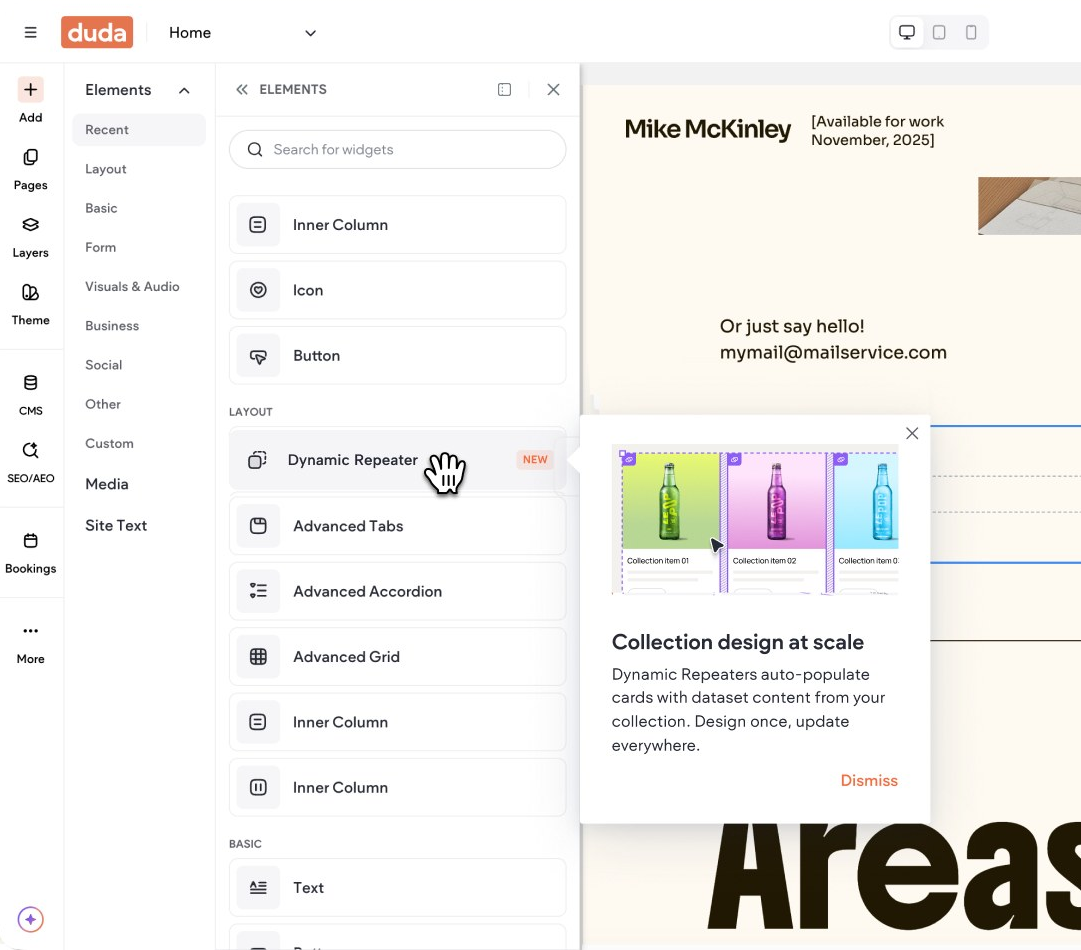
Duda's widgets panel with the new Dynamic Repeater widget

2 · Full flow

Dynamic Repeater full flow

3 · Design from any item

Design from any item

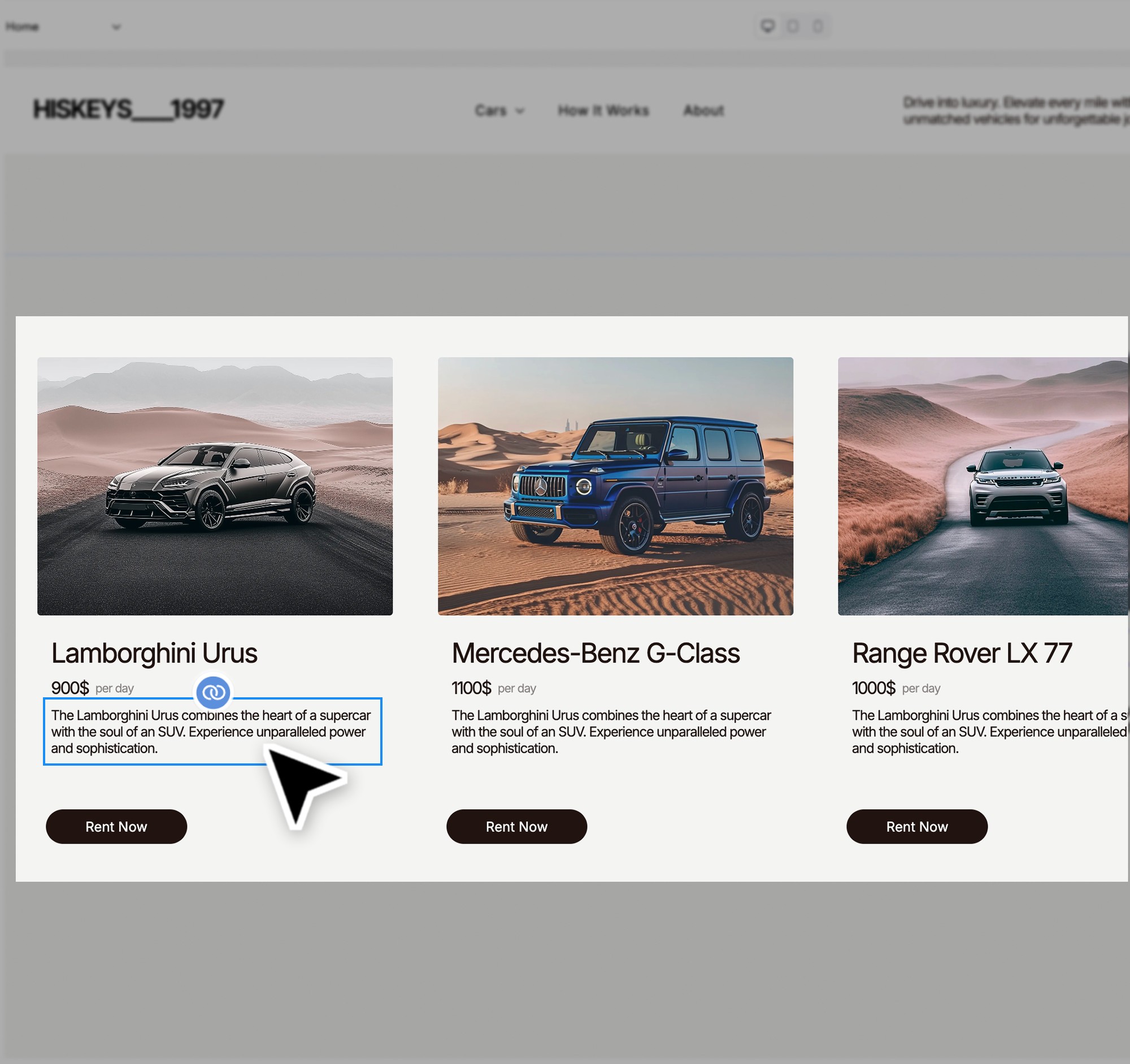
We deliberately avoided a single “master” card.
The design/layout change will apply on all cards.
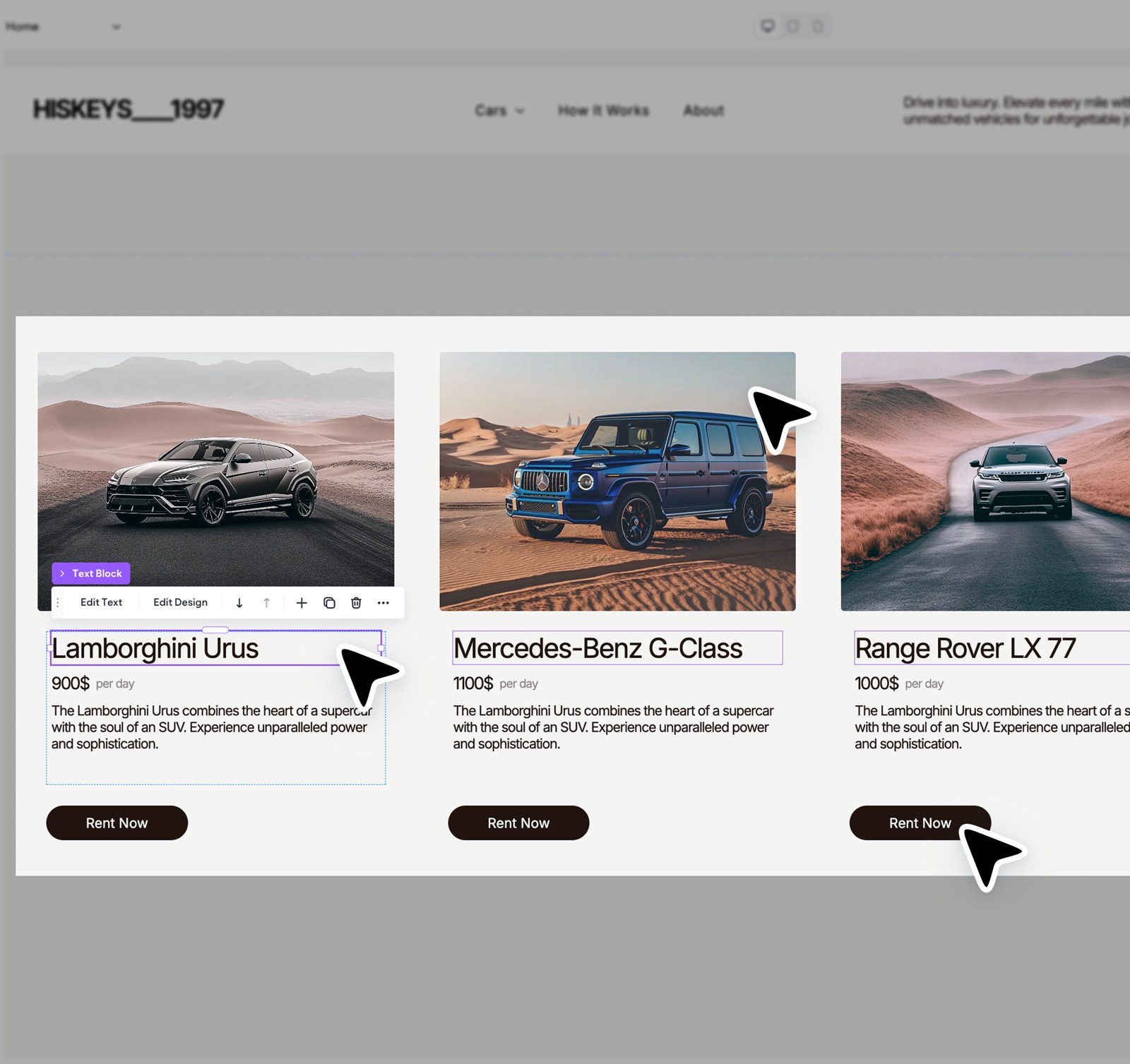
Editing one car card in a Dynamic Repeater; the change applies to all cards

4 · UI uplift

Clearer connections & familiar patterns

Applied across the platform

Before: blue, hover-only connection state After: purple connected state with selected instances highlighted

Before · Support only hover stateAfter · Support all states (selected, hover..) · selected instances are highlighted

4 · UI uplift

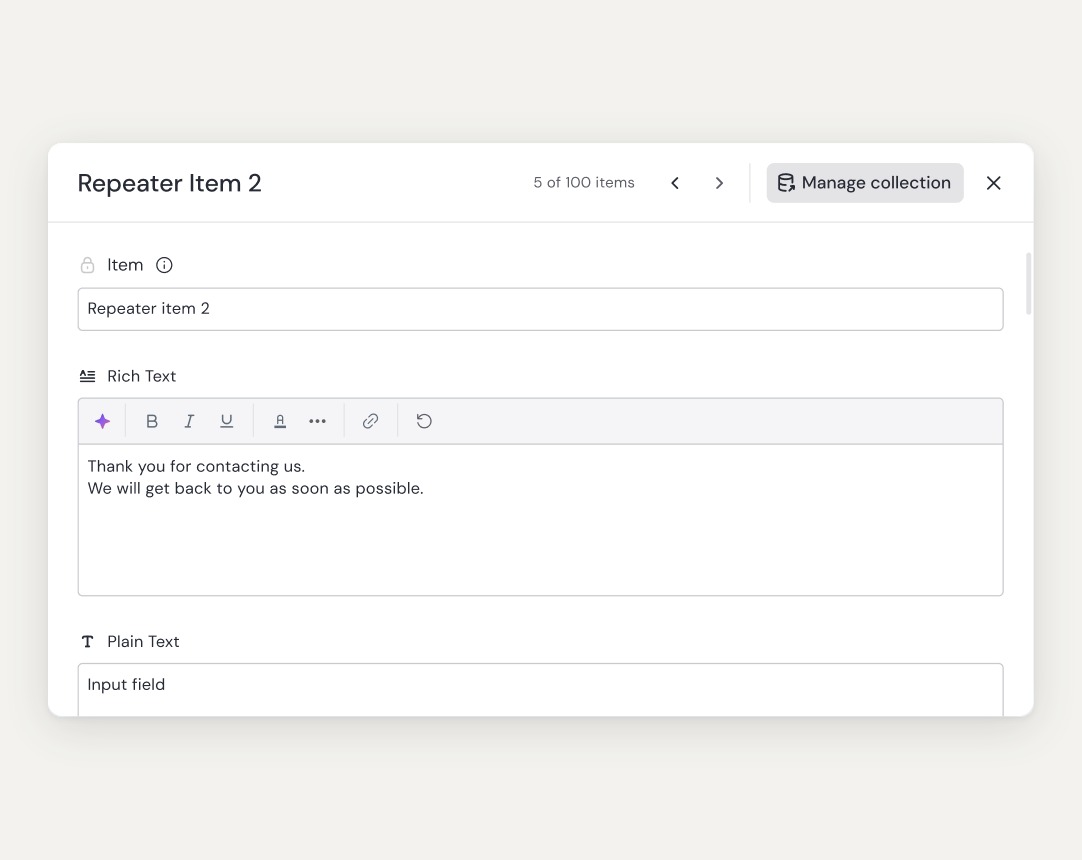
The item modal- familiar, but better

Originally requested by Duda’s partner
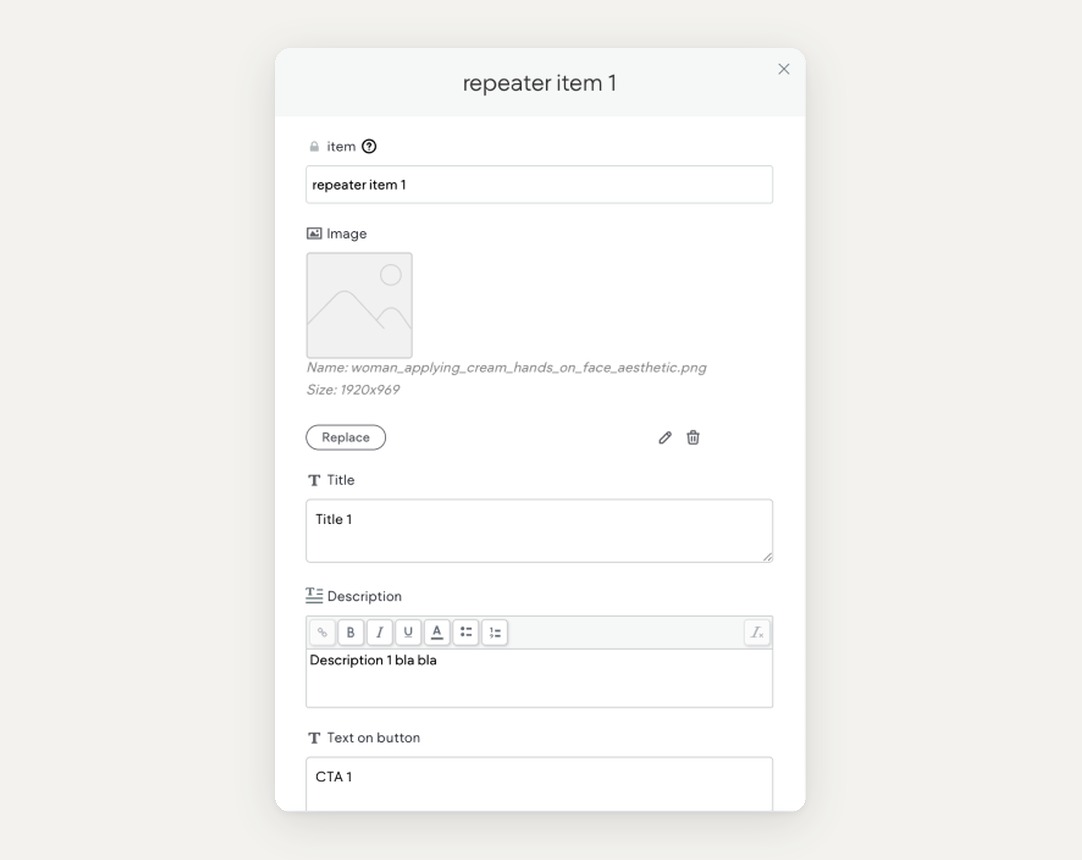
Before: the old, narrow collection item modal After: the wider item modal with pagination and a link to the full collection

After · Wider layout · Connected to design system · Link to full collection · Pagination

5 · Inline editing

Connected text

Edit connected text directly on the canvas- updates the data source automatically.

‘Collection name · Column name’- see which data field is connected
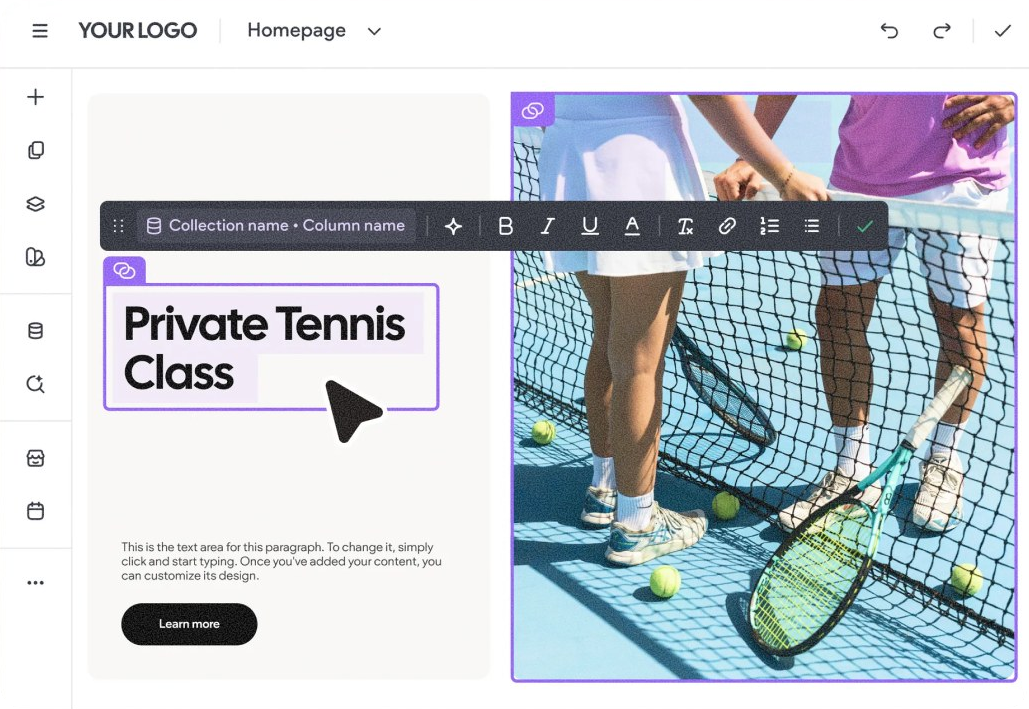
Editing a connected title inline

5 · Inline editing

Connected image

Replace a connected image from any instance- auto updates the data source.
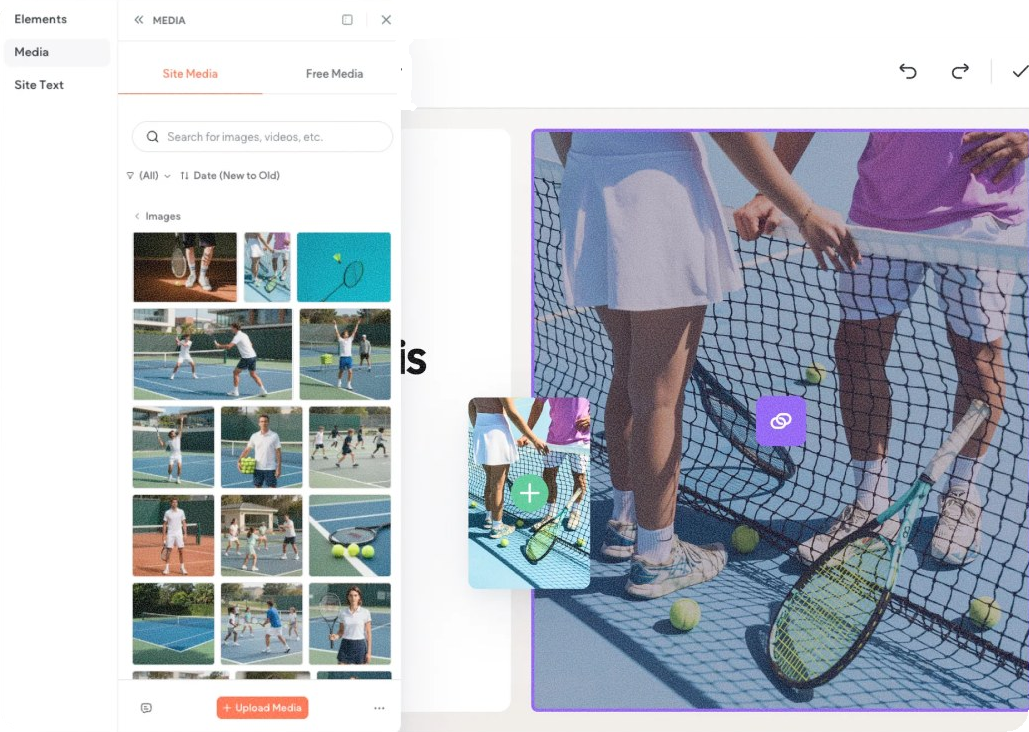
Dragging a new image onto a connected image
Before: blue, hover-only connection state After: purple connected state with selected instances highlighted

Before · Support only hover stateAfter · Support all states (selected, hover..) · selected instances are highlighted

Before: the old, narrow collection item modal After: the wider item modal with pagination and a link to the full collection

After · Wider layout · Connected to design system · Link to full collection · Pagination

Usability & improvements

Ship, watch, improve

Since the ux was based on an existing feature, we used the rollout as a usability tool, watching real users & receiving feedback from AMs instead of running formal sessions.
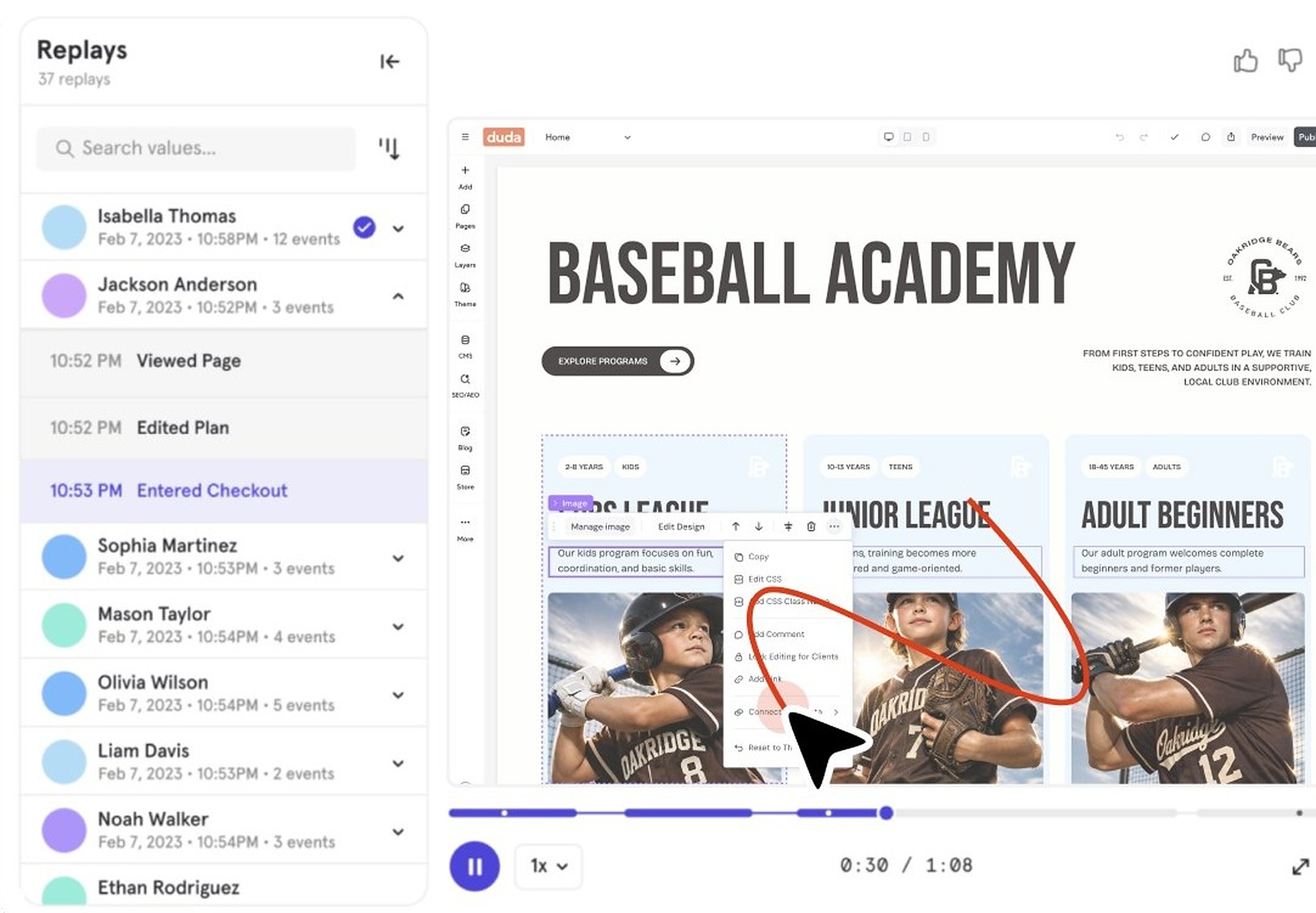

A Mixpanel session replay of a user working with a repeater in the editor
Watched Mixpanel recordings, collected feedback from partners
20% Launch Partner agencies & heavy dynamic pages users
Shipped fixes before scaling further
50% Week 4 Broader rollout with fixes applied
100% Week 8 Full Release

What we saw, what we did

SawDidStatus
Widgets ‘Replace Connection’ CTA wasn’t discoverable enoughMoved it higher in the menuFixed
Users repeatedly attempted to edit content directly on the canvasMoved inline editing up the roadmapFixed
Users disappointed when switching collections- content replaced with placeholdersAuto connect widgets to the new data sourceTo Explore
Non-blocker bugs surfaced before full releasePrioritized before scaling to 50%
Connect link to dynamic pages · + More
Prioritized

The data · last 4 months

Added Repeater events

{{nUsers}}Unique users
{{nEvents}}Total events = 2.4 adds per user

By account plan

Enterprise363 · 54% Agency246 · 37% White Label40 · 6% Team8 · 1% +3 others13 · 2%

Concentrated in highest tier plans

Monthly adds · by segment

Unique users \ month

150100500
FebMarAprMay
SMAMid-MarketEnterprise
Adoption ramp post full release

Source: Mixpanel | Feb 2026-May 2026 (May partial)

What I'd do next

1 of 3

Turn the plan wall to an upsell moment

Usage is low- and small agencies are the heaviest users, yet locked behind Agency plan. No competitor does this (besides Elementor). My bet: one free repeater on lower plans could unlock adoption and upgrades.

PlanWebflowWixFramerElementorDuda
Free✓✓✓--
Basic/starter✓✓✓--
Team✓✓✓Pro + ACF-
Agency/Pro✓✓✓Pro + ACF✓
Custom/Enterprise✓✓✓Pro + ACF✓

Elementor has no native repeater- Requires Pro + ACF Pro plugin

2 of 3
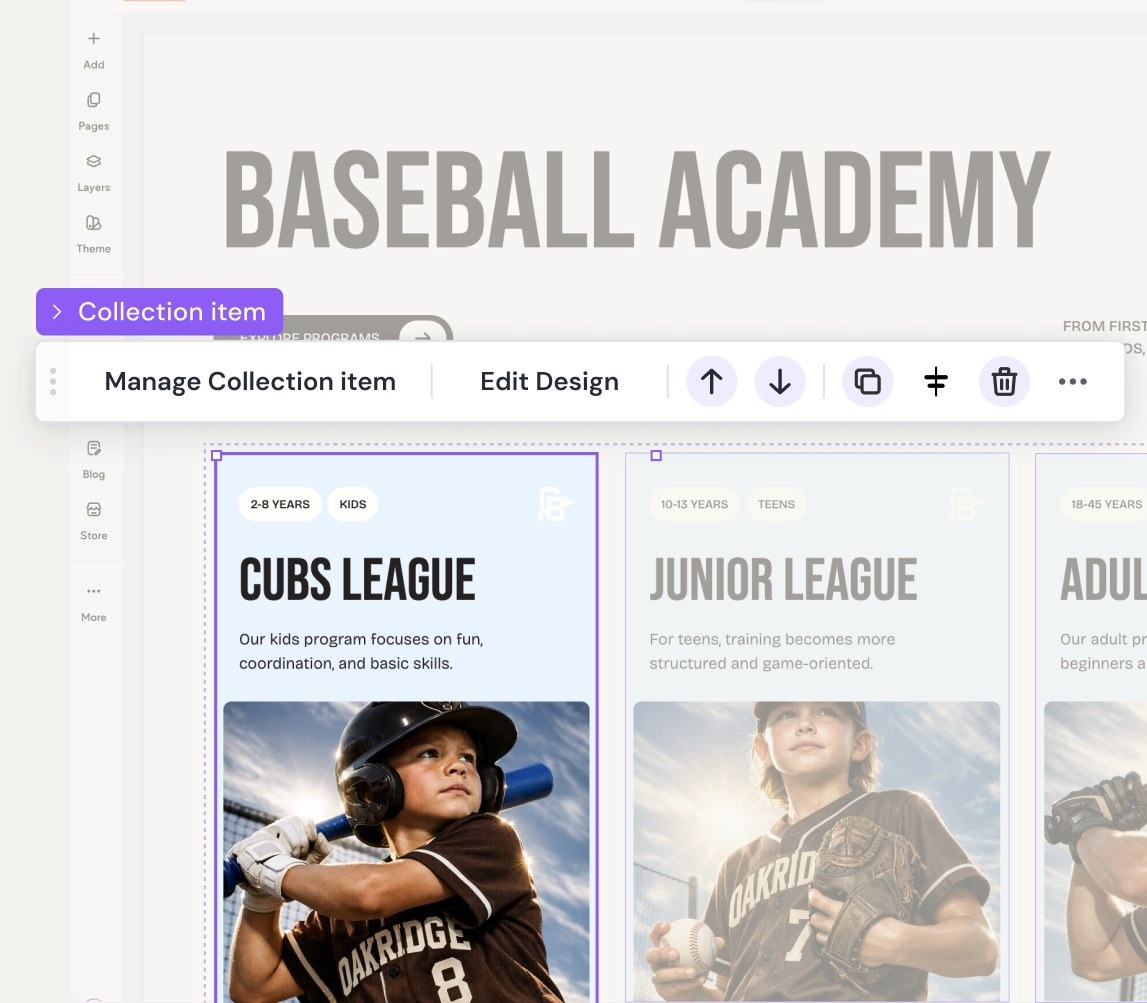
Repeater as a design tool

  • Enable common collection item actions on the canvas- duplicate, delete, hide- each reflected in the data source.
  • Use it as a pure design tool- repeating blocks without data, like Wix- or connect to data and hand off to clients for manual entry.
Concept: collection item actions (move, duplicate, delete) right on the canvas

3 of 3

AI reads your layout

A fully synced repeater- add a widget and a field appears in the data source. Replace the source and AI remaps the connections. No manual setup, no lost content.

Next case study · 02 Form Conditional Logic →

Let’s talk

Tamar Levi-AhdutPortfolio2026